
Note: this guide is ideal for Core customers. Enterprise customers will work with CS to create a more robust and detailed launch plan.
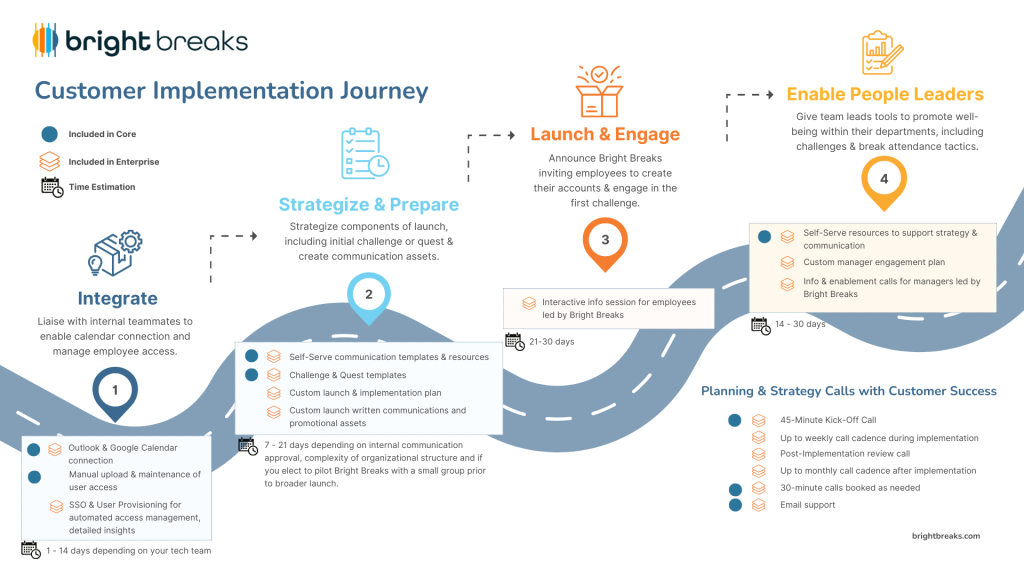
Before you get started, ensure you:
- Book a kick-off call with the Customer Success team and ensure they’ve sent you the links to your Champion portal and your organization’s Bright Breaks page.
- Create your own Bright Breaks account and take live breaks and view on-demand content. Get a feel for how to invite others to breaks by adding them to your calendar and inviting them to the calendar event.
- Ensure Daily Break (calendar-suggested breaks) is working for you.
- If using Outlook, to have permissions for employees to connect their calendars for the Daily Break feature to work properly, an admin of Outlook at your org will need to take action.See required permissions here.
Components of Launch & Early Implementation #
Before sharing Bright Breaks with your org members or developing communications, determine what your launch and early implementation will entail. While giving technical access if very simple, how the platform is introduced impacts success!
Before Launch #
Plan Rollout
Define the ideal launch day along with a challenge to incentivize your organization to participate. A challenge start date approximately one week within launch is recommended to leverage momentum.
Best practices for first challenge for a smooth introduction:
- The Take a Break challenge template is strongly recommended
- Keep the challenge to individual participation as opposed to teams
- 2-3 weeks in length, up to a month if you have a large organization
- Use a raffle method to determine winners as opposed to highest points accumulated
- Ask for no more than 5 points to be earned during the challenge period to qualify to enter the raffle
The above is a good introduction to Bright Breaks as a new concept and habit-builder without pressure to compete.
Note: While team challenges are great to see higher engagement later on, team challenges are generally not recommended as a first engagement initiative for breaks-based challenges. Bright Breaks will be unfamiliar as a concept to most and a team challenge may result in confusion and low engagement if combined with team competition.
Pilot Group Test – Optional but recommended
- Ask a group such as a wellness committee, to pilot Bright Breaks for at least a week and get their feedback and engagement ideas.
- Set up a test challenge during this time before other employees are granted or are aware of how to access.
Communication – Pre Launch Announcement
A pre-launch announcement to let org members know a new benefit is coming in written communication channels and company-wide calls.
Security & Access
Ensure the appropriate email address domains are allow-listed at the bottom of the Members tab in the Champion Portal.
Launch Day #
- Announce the Bright Breaks partnership and that access is open to your org members in written form and during a company-wide call if possible.
- Include communications about upcoming challenges/quests.
- If your organization is not using SSO/User Provisioning, enter a list of email addresses in the Members tab of the Champion Portal – they will receive an email invitation immediately to create their account.
Post-Launch #
Communication – Challenge Promotion
Continue promoting Bright Breaks, remind your organization to participate in the challenge and communicate winners. Challenge promotional scripts are generated dynamically in the Champion Portal by clicking ‘Promo’ on the Challenge card.
Enable team leads and mangers: to use Bright Breaks as a connection tool, such as inviting their team to join them on live breaks, running their own challenges for their teams as Advocates or you as a Champion setting up challenges on their behalf using the Link method for participation.
Continue posting well-being content: in internal channels every week to keep Bright Breaks top-of-mind, using our prepared promotional materials generated every month
Determine cadence of future challenges – this helps in keeping engagement elevated. A challenge at least once per quarter is recommended.
Bright Breaks organizations who run challenges or quests at least twice a year, see an average of 200% higher engagement than organizations that run 0.
Communication Resources #
Here are resources you can use to develop your communication assets:
- Launch communication scripts
- Bright Breaks presentation slide
- 1080 x 1080 px Image Template
- Bright Breaks logo
- For challenge and quest promotion, scripts are available by clicking “Promo” after a draft is created and saved in the champion portal
- See more assets here
Important Note: In order to successfully receive Champion Newsletters, please do not unsubscribe from all emails from Bright Breaks. Instead, manage your subscriptions and do not unsubscribe to Champion News or Adjust your email preferences directly in your Bright Breaks account in settings.
Should you have questions, please reach out to !


